AI Agents · Lesson L06
How to Pick the Cheapest AI Model for Hermes Agent (2026 Cost Guide)
The model you pick is the single biggest factor in your monthly bill. Here is how to read pricing tables, route cheap tasks to cheap models, and set a $20 budget cap on day one.
Last tested and updated: June 2026
Hermes doesn’t pick your model — you do. And the model you pick is the single biggest factor in your monthly bill.
Beginners who pick the most expensive model can spend $200/month on work a $10 model handles. Route cheap tasks to cheap models.
This lesson assumes one model is already configured. See L02 — Install & First Run and ai-models/L01 for setup.
The hook
Same workload, four models, 200× price spread. Here’s a real cost scenario. A beginner sends 100 messages a day. Average: 500 input tokens, 1,000 output tokens. Same workload, four different models:
- DeepSeek V4 Flash → ~$1.20/month
- Kimi K2.6 → ~$2/month
- Claude Sonnet 4.5 → ~$50/month
- Claude Opus 4.8 → ~$250/month
Same questions. Same answers (within 35% of tasks per the source video). Two-hundred-times price difference. The model choice — not the harness, not the interface, not the Skills — drives the bill.
The fix is a one-time mental shift: stop thinking “which model is best?” and start thinking “which model is cheap and good enough for this specific task?”
The mental model
Price is per million tokens, with three numbers per model. There are usually three numbers:
- Input price — what you pay for tokens you send (prompt + context).
- Output price — what you pay for tokens the model generates. Usually 3–5× more expensive per token than input.
- Cached input price (sometimes) — a discount for repeated context. DeepSeek and OpenAI offer this.
| Model | Input $/1M | Output $/1M | Cached input $/1M | Tier |
|---|---|---|---|---|
| DeepSeek V4 Flash | $0.10 | $0.30 | $0.02 | Executor (cheap) |
| Kimi K2.6 | $0.15 | $0.60 | — | Executor (cheap) |
| MiniMax M3 | $0.20 | $0.80 | — | Executor (cheap) |
| Claude Sonnet 4.5 | $3.00 | $15.00 | $0.30 | Reviewer (mid) |
| Claude Opus 4.8 | $15.00 | $75.00 | $1.50 | Orchestrator (expensive) |
| Claude Fable 5 | $25.00 | $125.00 | — | Mythos (rare) |
Two things to notice. Output is 3–5× more expensive than input — long answers cost more than the input number suggests. The top-to-bottom spread is roughly 250×. That pricing table isn’t a rounding error. It is the bill.
The tier-list pyramid
The way to think about routing: stack models by how often they should be called, not by how good they are.
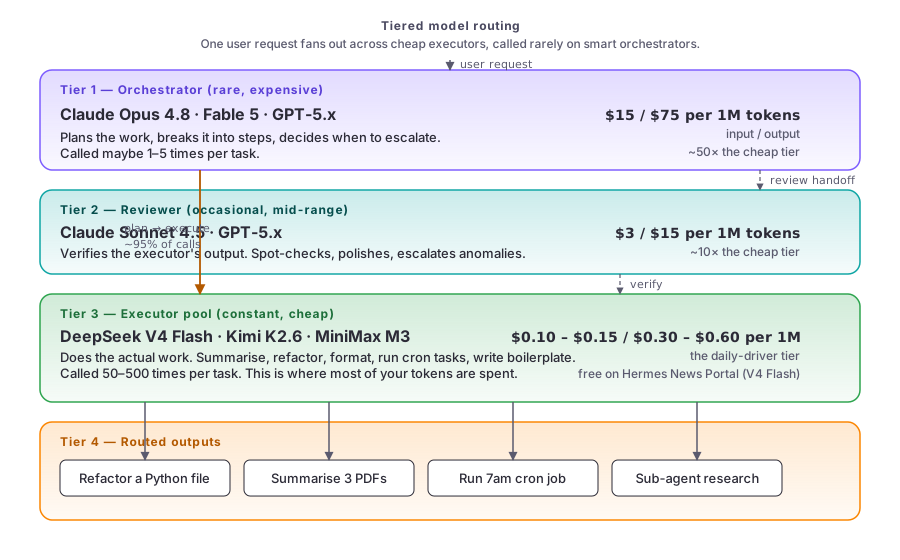
Four tiers, top to bottom:
- Orchestrator (rare, expensive). Opus 4.8, Fable 5. Plans the work, decides when to escalate. Called maybe 1–5 times per task. ~95% of your cost if you let it run unbounded.
- Reviewer (occasional, mid-range). Sonnet 4.5, GPT-5.x. Verifies the executor’s output. Spot-checks and polishes. Called when something looks off.
- Executor pool (constant, cheap). V4 Flash, Kimi K2.6, MiniMax M3. Does the actual work — refactor, summarise, format, run cron. Called 50–500 times per task. This is where ~95% of your call count lives.
- Routed outputs. The concrete tasks: refactor a Python file, summarise 3 PDFs, run a 7am cron, parallel sub-agent research.
The hot path is tier 1 → tier 3 (orchestrator plans, executors do). The cold path is tier 2 ↔ tier 3 (reviewer spot-checks the executors).
Background: L01 — What Is Hermes Agent? (model vs harness). Tier context: ai-models module.
Pick your tool
Match the task to a tier, then to a model.
| Task | Tier | Pick | Why |
|---|---|---|---|
| Refactor / review / explore / cron | Executor | V4 Flash / Kimi / M3 | Cheap, fast, good enough — 95% of calls land here |
| Summarise long documents | Executor | V4 Flash | 1M context, source-tested |
| One-shot creative writing | Orchestrator | Opus / Sonnet | Polish matters |
| Hard reasoning / vision / plan | Orchestrator | Opus / Fable 5 / GPT-5.x | When you genuinely need the best |
| Sub-agent delegation (parallel) | Orchestrator (speed) or Executor (cost) | Opus for time-sensitive, V4 Flash overnight | Speed vs cost trade-off |
Decision guide:
- If your main goal is to save money → start with V4 Flash. Graduate to Opus only when you hit a wall.
- If your main goal is quality output → start with Opus. Watch your bill carefully and graduate to cheap where you can.
- If your main goal is balanced → use tiered routing. V4 Flash by default, Opus for hard stuff.
Cross-harness pricing: L09 — Hermes Agent vs Claude Code vs Mavis.
The non-negotiable first step: set a budget cap
Do this today, before your first invoice, before you forget. For each model provider you use:
- Log in to the provider’s dashboard (Anthropic, OpenAI, DeepSeek, etc.).
- Find the Billing section.
- Set a hard monthly cap. $20 is reasonable for a beginner. $50 if you’re doing heavy cron work.
- Set up email alerts at 50%, 80%, and 100% of the cap.
Real cost per beginner task (worked examples)
Task 1 — Refactor a 100-line Python script. V4 Flash: ~$0.02. Opus: ~$0.80. Use V4 Flash. The task is well-defined.
Task 2 — Read three 100-page academic papers, merge the summaries. V4 Flash: ~$0.30 (source-video tested, all three docs in 2 minutes). Opus: ~$3.00. Use V4 Flash.
Task 3 — “Solve this logic puzzle.” V4 Flash: passes. Opus: passes. Use V4 Flash if you trust the answer; Opus if you need to verify.
Task 4 — Sub-agent delegation for parallel research. V4 Flash: 14 minutes, complete output (per source). Opus: ~3–5 minutes for the same work. For time-sensitive delegation, use Opus. For overnight research, use V4 Flash.
Task 5 — One-shot creative writing (a blog post intro). V4 Flash: inconsistent, verbose, misses the mark. Opus: more polished first drafts. Use Opus for creative one-shots. The polish matters.
Switching models mid-session
You can switch without losing context. In the TUI, run hermes model and pick from the list. In the Desktop App, use the model switcher in the sidebar. V4 Flash is currently free on the Hermes News Portal.
Try it
Inspect your last 30 days of spend and reroute one task to a cheap model.
The exercise
Open your model provider’s dashboard. Look at the last 30 days of usage and find the single most expensive model you ran. Ask yourself: could V4 Flash have done that work for 1/10th the cost?
Write down two things in a text file:
- One task from the last 30 days that should have been routed to a cheap model. Be specific — “the daily folder summary cron” beats “summarisation work.”
- One task that genuinely needed an expensive model. The polish, the vision, the hard one-shot. This proves you understand the routing rule isn’t “always cheap.”
Watch the full breakdown
If you’d rather see the cost numbers in Ron’s voice — 22 minutes, the source video this lesson is grounded in:
For the broader model tier list (Opus 4.8, Fable 5, GPT 5.4, Gemini 3.1 Pro, GLM 5.1, Kimi 2.5 and the rest):
Check your understanding
Quiz: see quiz.json (6 questions, valid JSON).