AI Agents · Lesson L01
What Is Hermes Agent? A Beginner's Guide to AI Agent Harnesses (2026)
An AI agent harness wraps a model so it can read files, run commands, schedule jobs, and remember context across sessions. Hermes is the harness we'll use in this course.
Last tested and updated: June 2026
An AI agent harness wraps a model. It reads files, runs commands, schedules jobs, remembers context. Hermes is the harness we’ll use in this course.
The hook
A harness turns an AI from something you chat with into something that works for you in the background. It posts to Discord at 7am. It files a GitHub issue. It pushes a Notion page. It runs while you sleep.
This is the first lesson in the academy. The install lesson is next, in L02 — How to Install Hermes Agent for Beginners.
The mental model
A model is a brain, a harness is a body.
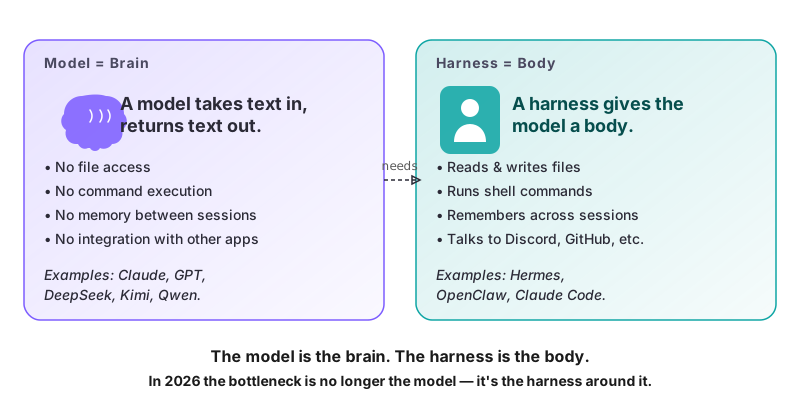
A model (Claude, GPT, DeepSeek, Kimi, Qwen) takes text in and returns text out. On its own, it can’t read a file on your computer. It can’t run a command. The model is the brain.
A harness is the program that wraps the model. It reads your codebase, runs shell, posts to GitHub, schedules jobs. It remembers a preference across sessions. The harness is the body.
When your AI messes up, the problem is almost always the harness (source video GGtmmx0MKCI, 2:30). Not the model. In 2026 the models are good enough. The differentiator is what wraps them.
Pick your tool
In 2026, harnesses split into two broad categories.
| Goal | Pick | Why |
|---|---|---|
| Code work inside a codebase | A coding harness (Claude Code, Kilo Code, Cursor agent mode) | Verifies by running tests and checking CI. |
| Recurring, non-code work outside a codebase | Hermes | Long-running, multi-channel, learns your style over time. |
For a deeper comparison once you’ve tried both, see L09 — Hermes Agent vs Claude Code vs Mavis.
What Hermes specifically is
Hermes is an open-source agent harness. It runs on your laptop or a small rented server (a VPS, virtual private server). It is the program that wraps a model. Source: Hermes GitHub repo.
From the project’s documentation: “We are not a coding co-pilot tethered to an IDE. We are an autonomous agent that gets more capable the longer it runs.”
In practice, Hermes can:
- Read and write files in a working directory you specify.
- Run shell commands and verify their output.
- Remember context across sessions, especially things you flag as important.
- Be scheduled to run tasks at specific times (covered in L08 — Automation: cron, kanban, sub-agents).
- Connect to GitHub, Linear, Notion, Discord via MCP (Model Context Protocol, see L05).
What Hermes is not:
- Not a chat app. It’s a terminal program. You can wrap it in a desktop UI, but the underlying interface is text.
- Not a model. You bring your own key (BYOK = “Bring Your Own Key”). Use Anthropic, OpenAI, DeepSeek, Kimi, etc. Cost = model spend.
- Not magic. It improves with use, but you put in the time. See source video
GGtmmx0MKCI, 18:40.
What you’ll see when you install it
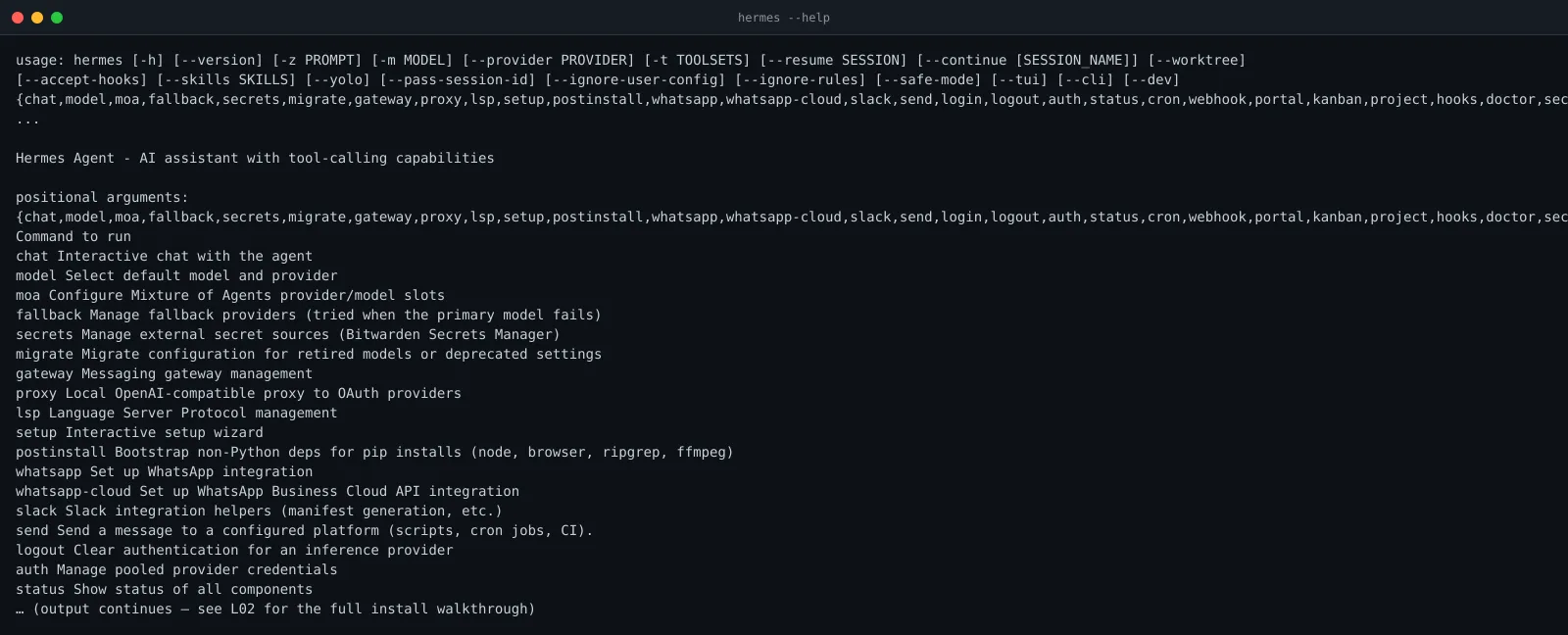
When you run hermes --help, you get the full subcommand list. Notice: it’s not a chat interface. It’s a CLI (command-line interface) toolkit.
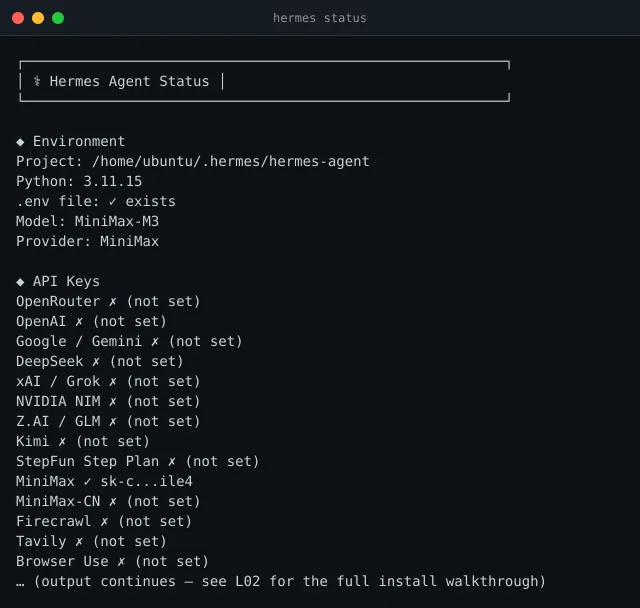
After install, hermes status gives a one-screen health check of every component:
Try it
The exercise
Open a text file on your computer. Write down this answer in your own words, no copy-paste:
“If I want to post a summary of today’s top 3 AI news stories to my Discord every morning at 7am, which kind of harness should I use, and why?”
A good answer names Hermes (an agent harness) or Claude Code (a coding harness), and gives one concrete reason. If you can do that without re-reading the lesson, you have the core idea.
A sneak peek at what’s coming
The 7am Discord job above is a real workflow you’ll build later. Here’s the shape:
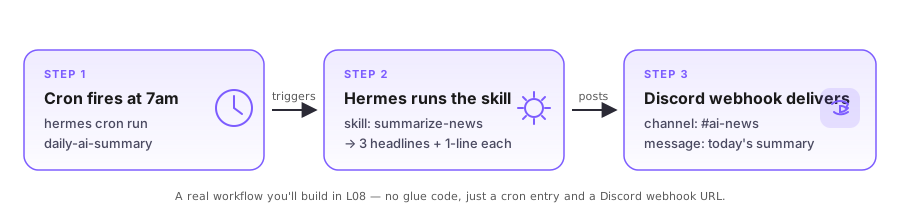
You don’t write glue code. You register a cron entry, point Hermes at a skill, and paste a Discord webhook URL. L08 — Automation walks you through it end-to-end.
Watch the full mental model
Prefer hearing this from Ron? 13 minutes, same source video:
Check your understanding
Quiz: see quiz.json for the 6 standalone questions.
What’s next
- Install it. → L02 — How to Install Hermes Agent for Beginners. The full install takes under 20 minutes on a fresh Mac.
- Still not sure? → L09 — Hermes Agent vs Claude Code vs Mavis is a deeper comparison.