AI Agents · Lesson L02
How to Install Hermes Agent for Beginners (2026): Mac and VPS, Step-by-Step
Install Hermes on Mac or VPS in under twenty minutes. Pick a model, paste an API key, verify with `hermes doctor`.
Last tested and updated: June 2026
Hermes installs in one curl-pipe-bash on Mac or VPS; pick Mac first to learn.
Before you install
Install Xcode Command Line Tools first. Skip this and the installer fails with “no developer tools were found.”
Open Terminal (Finder → Applications → Utilities → Terminal) and run:
xcode-select --installClick Install. The first run downloads 500 MB and takes five to ten minutes.
You also need a model provider account. Hermes is the harness — it does not bundle model access. Bring your own key (BYOK = your provider’s API key). Supported providers are Anthropic, OpenAI, DeepSeek, Kimi, MiniMax, and Qwen. The Mac path needs macOS 13 or newer.
Two paths: Mac vs VPS
Pick Mac for learning. Pick VPS for 24/7 cron jobs. A $3/month VPS keeps running when your laptop lid is closed.
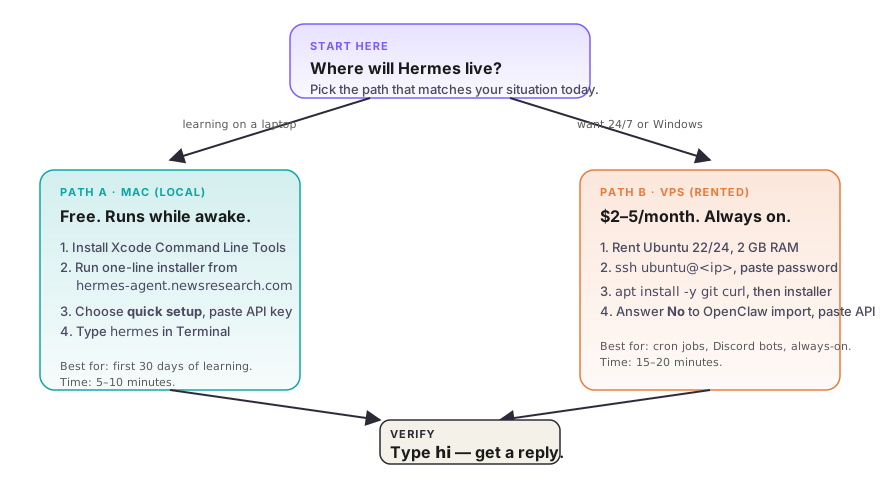
Mac (local). Hermes runs on your laptop. Free. Fastest iteration. Downside: only runs while your laptop is awake.
VPS (rented Linux server). Hermes runs on a small rented Linux box. $2–$5/month at Hetzner, DigitalOcean, Vultr, or Linode. Runs 24/7. Downside: you must learn SSH.
| Situation | Path |
|---|---|
| Brand new to terminals or cheapest test drive | Mac |
| Want 7am cron while you sleep | VPS |
| On a Windows PC | VPS |
| Plan to wire Telegram or Discord bots | VPS |
The Mac path
After xcode-select --install finishes:
curl -fsSL https://hermes-agent.newsresearch.com/install.sh | bash
hermes
Pick quick setup in the wizard. Skip Telegram and Discord on first install. L05 wires those properly.
The VPS path
The VPS path = SSH (Secure Shell, an encrypted terminal into a remote box) plus the same installer as Mac.
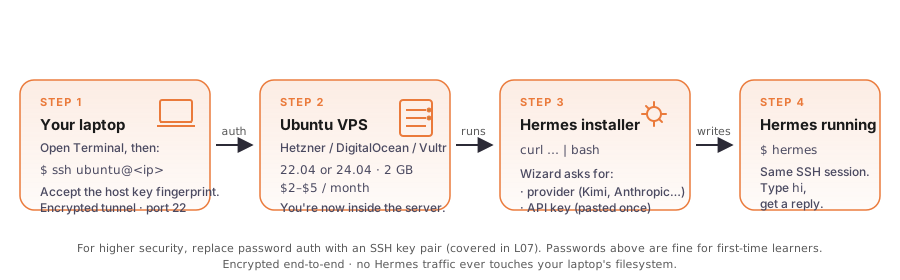
- Rent a server. Ubuntu 22.04 or 24.04, 2 GB RAM, $2–$5/month.
- SSH in.
ssh ubuntu@<your-server-ip>. Typeyesto trust the host fingerprint. Paste the password — the cursor does not move. That is normal. - Install deps.
sudo apt update && sudo apt install -y git curl. - Run installer. Paste the one-line command. When asked about importing from OpenClaw, answer No — even if you used OpenClaw before.
Pick your model
Start with Kimi K2.6 or DeepSeek V4 Pro. Upgrade to Claude Sonnet only when you can see the loop working and need the quality.
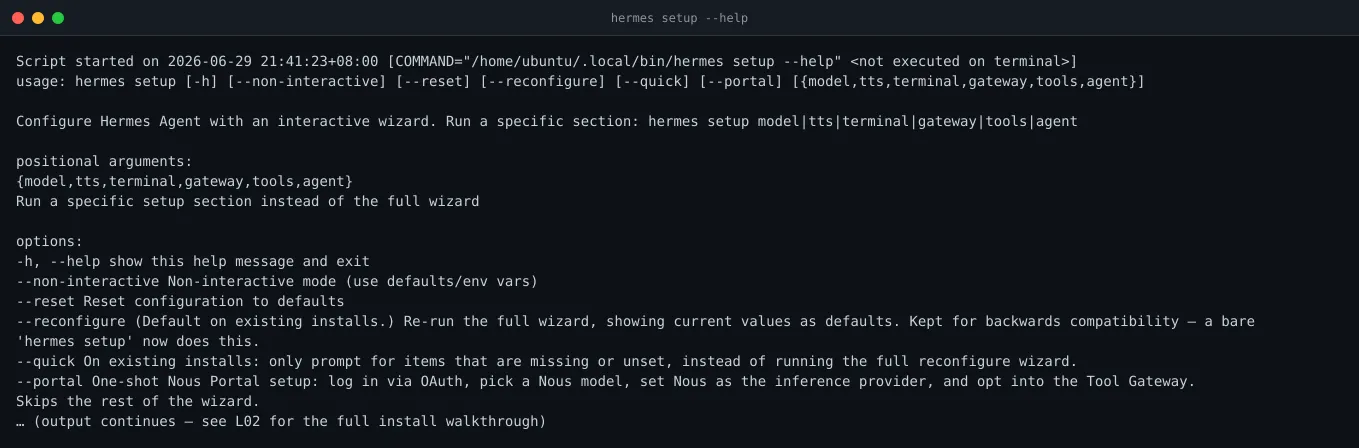
Picking the right model decides whether you spend $5/month or $50/month. The wizard asks for a provider and an API key. You can swap providers later by re-running hermes setup.
| Provider | Pick when… |
|---|---|
| Kimi K2.6 (Moonshot) | Cost matters most; daily use, non-English |
| Claude Sonnet 4.8 (Anthropic) | Reliable quality, broad capability |
| Claude Opus 4.8 (Anthropic) | Long-context or high-stakes deliverables |
| DeepSeek V4 Pro | Cost-efficient, broad capability |
| OpenAI GPT-5.x | Solid general-purpose |
| MiniMax M3 | Cost-efficient execution |
At 50–100 messages per day on the cheap tier, expect $5–$10/month. Claude Opus runs 4–5× that.
Set a $20/month hard cap in the provider’s billing dashboard on day one. API keys are passwords. Paste them only into the wizard.
Verify it works
Run these three commands. All three must return without error.
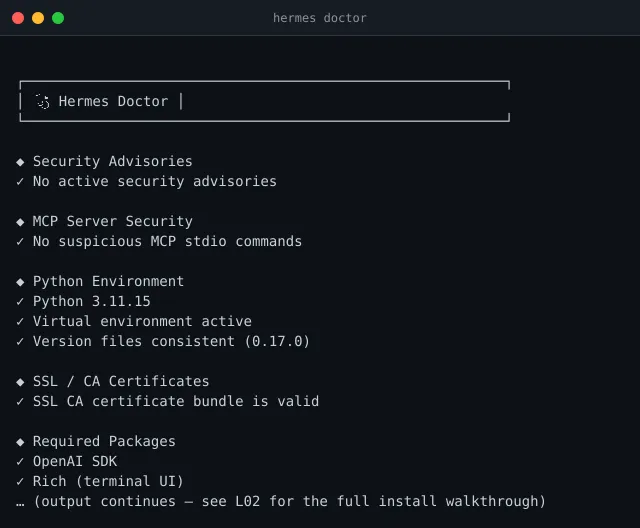
hermes doctor          # checks Python, SSL, dependencies
hermes status          # shows config, API keys, version
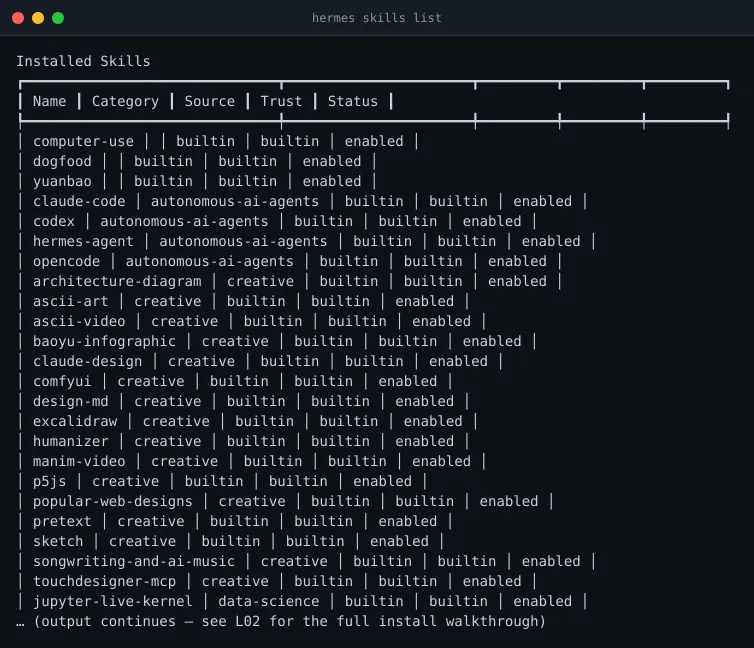
hermes skills list     # enumerates available skills
A healthy doctor looks like this.
hermes setup --help lists subsections you can re-run individually — useful for swapping providers later.
hermes skills list shows what Hermes can invoke.
The final smoke test: launch chat, type hi. If Hermes responds, the install is complete.
hermes
> hi
< Hello! How can I help today?
A one-liner that proves the same thing without interactive chat:
hermes doctor >/dev/null 2>&1 && echo "hermes install verified" || echo "hermes install FAILED"If you see an error, the cause is usually a wrong API key. Re-run hermes setup to fix a bad key. On VPS, install missing deps with sudo apt install -y curl git.
Watch the full install
Check your understanding
Quiz lives at site/src/lessons/hermes/L02-install-and-first-run/quiz.json — 6 questions, runnable by the lesson harness.
What’s next
- Pick your daily interface. → L03 — Hermes TUI vs Desktop App.
- Lock down security. → L07 — How to Secure Your Hermes Agent. Required within a week, especially on VPS.
- Schedule a job. → L08 — Automation: cron, kanban, sub-agents. That is the workflow you signed up for in L01.