AI Agents · Lesson L04
Hermes Agent Skills and Skill Bundles Explained for Beginners (2026)
How to turn the prompts you keep re-typing into reusable Skills, and how to group them into Skill Bundles so one slash command replaces five.
Last tested and updated: June 2026
A Skill stops you from re-asking one prompt. A Skill Bundle stops you from re-asking five prompts in a row. A Skill is a markdown file. A Bundle is a small YAML file that loads several Skills at once.
Prereqs: L02 — Install & first run and L03 — TUI vs Desktop.
The hook
One workflow with five steps breaks when you ask for it in a single prompt. Take morning research: discover sources, pull articles, extract key points, organise them, write a brief. Five steps. Hermes may skip extraction. It may skip organisation. Same prompt, different results.
“AI agents are probabilistic in nature. You cannot assume that they know all of the skills you want them to use to finish those tasks.” — Ron, source video _A02brv2Csg.
Two ideas solve this:
- A Skill — a markdown file that tells Hermes how to do one specific job. The file becomes a slash command. Type
/standupand Hermes reads the file. - A Skill Bundle — a group of Skills loaded together. Type
/researchand Hermes loads all five Skills at once, in the order you specified, with aninstructionfield that sets the workflow.
The mental model
A Skill is a command. A Bundle is a workflow.
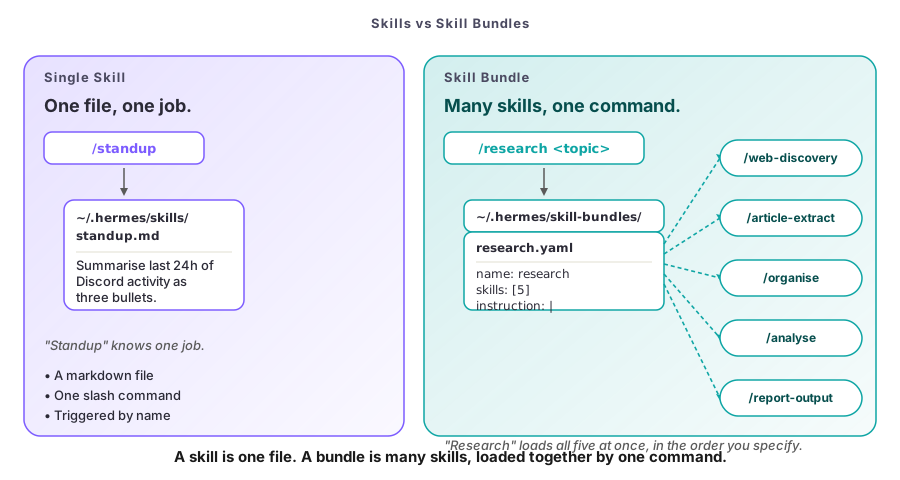
A Skill is a markdown file in ~/.hermes/skills/. The filename minus .md is the slash command. standup.md becomes /standup. Type it and Hermes reads the file. Write Skills by hand. hermes skills new --from-last-session saves the recipe after a useful run.
A Skill Bundle is a small YAML file in ~/.hermes/skill-bundles/. It names a group of Skills and an instruction field. The YAML’s name becomes the slash command. Type /research and Hermes loads every Skill in the list. Then it applies the instruction to chain them. Ron: “a named set of skills behind the slash bundles command.”
The shape of a Bundle:
name: research
description: General-purpose research workflow
skills:
  - web-discovery
  - article-extraction
  - topic-organisation
  - synthesis-analysis
  - report-output
instruction: |
  When invoked, produce a research report covering the topic end-to-end.
  Use the discovery Skills first, then extraction, then organisation, then
  analysis, then output. Include citations.
The instruction field is the part most people miss. It’s a “mini agents.md” — house rules baked in once so you don’t retype them. Common rules: “Always cite sources.” “Use the last 7 days only.” “Output as markdown with a TOC.” That’s what makes Bundle output consistent across runs.
One honest limit to know up front. As of June 2026, Skill Bundles are not adaptive. They run Skills in the order you specify. If your workflow needs different Skills based on intermediate results, split it into multiple Bundles. Or write a single Skill with branching logic.
Pick your tool
Three questions decide Skill vs. Bundle vs. prompt. Answer them in order.
- Will I ever do this again? If no, just type the prompt.
- Is this one job? If yes, make a Skill. The third time you do a task, save it.
- Does it need three or more Skills together? If yes, make a Bundle.
| Situation | Right answer |
|---|---|
| One-off question you’ll never repeat | Just type the prompt |
| Task you’ve done three times | Make a Skill |
| Three or more Skills that always go together | Make a Bundle |
Multi-step workflow with branching, or team-shared, or agent-saved via --from-last-session | Multiple Bundles, or one Skill with branching, or commit YAML to a shared repo |
See L01 — What Is Hermes Agent? for the harness-vs-model picture. For cron wiring, see L08 — Automation: cron, kanban, sub-agents.
The day-to-day pattern
Common slash commands once you build a few Bundles:
/research <topic>— news scan./standup— overnight summary./pr-review— pull-request critique./wrap-up— commit and draft tomorrow’s TODO.
On a team, commit the YAMLs to a shared repo. Ron’s recommendation: “commit the bundle files into your dot files or a shared repo.”
Try it
The exercise
Pick a recurring workflow you do at least weekly. Morning research. End-of-day wrap-up. PR review. Anything with three or more steps.
Step 1 — Co-design with Hermes. In the TUI, ask:
“Suggest which Skills we need to bundle for a [your workflow name] workflow.”
Hermes reads its own Skill catalog and proposes a grouping. Read the plan, edit it, ask again. Iterate.
Step 2 — Create the Bundle.
hermes bundles create <your-workflow-name>Step 3 — Edit the YAML. Open ~/.hermes/skill-bundles/<your-bundle>.yaml and tighten the instruction field. Be specific: “Use only the last 7 days. Always include three citations. Output as markdown with a TOC.”
Step 4 — Reload and test.
hermes bundles reloadInvoke your Bundle with /<your-workflow-name> three times on the same topic. Same output structure all three times = good instruction. Wild variation = needs more specificity.
Step 5 — Share it. Commit the YAML to a shared repo or dotfiles. That’s how Bundles become a team standard.
Success criteria
- All three test invocations produce consistent output — same structure, same sections, same level of detail.
- The Bundle loads in under a second (no expensive one-time work in any of the Skills).
- You can describe the workflow in one sentence to a teammate who has never seen it.
Watch the full walkthrough
If you’d rather watch Ron build a Bundle end-to-end, here’s the full clip:
Check your understanding
Quiz: see quiz.json (6 questions, valid JSON).