Release brief · July 20, 2026
Hermes Agent just got much faster. The reliability upgrades matter more.
Quicksilver cuts cold-start delay from 4.3 seconds to 0.9, but its durable delivery, vault-backed secrets, and safer approvals are the changes worth keeping.
Upgrade if Hermes is already part of your daily workflow. The speed is obvious in the first minute. Durable delivery, safer secrets, and reliable delegation are what make v0.19.0 worth trusting with real work.
Hermes did not ship a new model. It fixed the part that makes a capable model either useful or exhausting to live with.
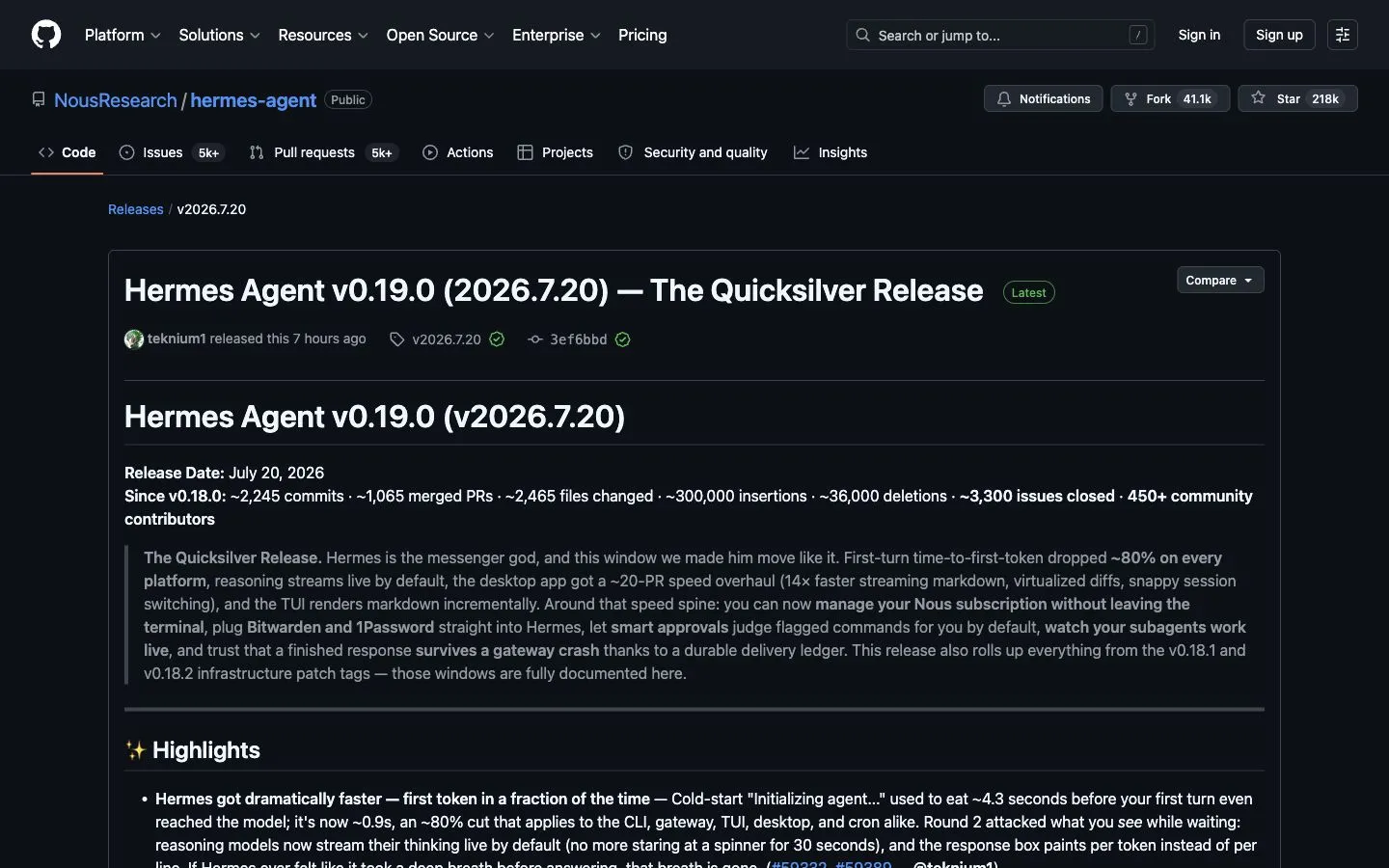
v0.19.0, released by Nous Research on July 20, 2026, is a major release of the agent harness around the model: the tools, memory, approvals, messaging, background workers, profiles, and interfaces that decide whether work starts quickly, survives a restart, reaches the right chat, and uses the right secrets.
The official name is “The Quicksilver Release.” That fits the first impression. Cold submit-to-dispatch time reportedly falls from 4.3 seconds to 0.9. The better part is what happens after that first response, when a delegated task finishes, a gateway restarts, or a secret needs to stay out of a config file.
The short version
- Nous reports that first-turn time-to-first-token fell by about 80%, with cold submit-to-dispatch time dropping from roughly 4.3 seconds to 0.9 seconds across the CLI, gateway, TUI, desktop app, and cron workflows.
- Reasoning output now streams by default, responses paint token by token, and the desktop app received a wide performance pass including much faster streaming Markdown and virtualized large diffs.
- Smart approvals are now the default. An independent reviewer model assesses flagged commands, while user-defined deny rules can block commands even in YOLO mode.
- Hermes can load secrets from Bitwarden and 1Password instead of requiring API keys in plaintext configuration files.
- Background delegation and message delivery now use durable ledgers, reducing the risk of completed work disappearing after a restart or gateway crash.
- One gateway can route different servers, channels, or threads into isolated profiles with separate memory, skills, secrets, and configuration.
- Fireworks AI, DeepInfra, Upstage Solar, new model catalog entries, richer session exports, terminal subscription management, and a broad security pass round out the release.
These performance figures come from the Hermes maintainers, not an independent Superbash benchmark. They are a reason to upgrade and test your own workflows, not a reason to trust a number blindly.
Speed is the change you will notice first
Earlier versions could leave you staring at a pause before the model had started. v0.19.0 clears work from that first-turn path: capability detection is cached, known non-Ollama providers skip an unnecessary probe, and less initialization blocks dispatch.
The release notes put that wait at about 0.9 seconds instead of 4.3. Reasoning models now show their thinking stream, and the response box paints token by token instead of holding a blank spinner until a complete line arrives.
Desktop users receive a second layer of improvements. Nous says incremental Markdown processing uses 14 times less CPU in the relevant splitter path. Large diffs are virtualized instead of rendering everything at once, session switching does less layout work, hidden panes mount later, and unrelated sidebar or tool rows no longer re-render on every streamed token.
Try it with a long session. Switch between two conversations, ask for a change that produces a large diff, then watch the first response and the review pane. That will tell you more than any launch chart.
Smart approvals reduce prompts without removing your veto
The new default approval mode is smart. When Hermes flags a command, a reviewer model evaluates that individual command instead of automatically asking you about every warning. Approval does not become a permanent wildcard: a later command receives its own verdict.
Two controls make this more useful than a simple “approve more” switch:
- User-defined deny rules are checked before the normal approval flow and still apply when approval prompts are disabled.
/deny <reason>lets you explain why a command was refused, giving the agent information it can use to choose a safer route.
This should reduce approval fatigue, but it is not a reason to stop reviewing consequential actions. Keep explicit deny rules around credential stores, destructive filesystem commands, production databases, and deployment infrastructure. A reviewer model is a friction-reduction layer, not your final security boundary.
If you prefer predictable manual confirmation, Hermes still supports manual mode. The documented configuration command for the new default is:
hermes config set approvals.mode smartSecrets can stay in a real vault
v0.19.0 introduces a pluggable SecretSource interface with Bitwarden and 1Password support. Hermes can resolve 1Password op:// references and load values at runtime, with deterministic precedence, conflict warnings, multiple vaults, and provenance for each variable.
This is a meaningful operational improvement. Moving a key out of .env does not solve every security problem, but it reduces plaintext copies and makes rotation, team access, and auditing easier. Before migrating, choose the authoritative vault, remove duplicate definitions deliberately, and verify that one profile cannot read another profile’s secrets.
A finished task is less likely to vanish
Hermes has delegated work to subagents for several releases. Quicksilver deals with the irritating part: the work finishes, then a restart or gateway crash eats the result before you see it.
delegate_task now exposes live transcript files that can be tailed while a worker runs, including tool calls, results, and streamed replies. More importantly, background completion is recorded in an ownership-checked ledger so a restart does not automatically discard the result.
The gateway receives a similar safety net. Final responses are recorded in a delivery-obligation ledger around the platform send. If the gateway crashes after generation but before delivery is confirmed, Hermes can redeliver the response on startup. This targets a particularly frustrating failure mode: paying for a completed Telegram, Discord, Slack, or other messaging turn and receiving nothing.
Durability does not mean every external platform will deliver exactly once under every failure. It does mean Hermes now keeps explicit state for an obligation that was previously easier to lose silently.
One gateway can serve isolated work and personal profiles
A single gateway can now share one bot token while routing specific guilds, channels, or threads to different profiles. Each profile can have its own configuration, memory, skills, and secrets.
That makes a clean pattern possible:
| Route | Profile | Isolation goal |
|---|---|---|
| Work Discord server | work | Company tools, work memory, approved work vault |
| Personal chat | personal | Personal automations and private preferences |
| Project thread | project-x | Narrow skills and secrets for one deployment |
Nous also says one misconfigured profile should no longer take down the multiplexed gateway. If you adopt this setup, test routing with harmless prompts first and verify memory and secret boundaries before connecting production tools.
Run Hermes 24/7 on a VPS
A laptop is the easiest place to learn Hermes, but it is a poor host for an assistant that needs to answer messages, run scheduled jobs, or finish background work while you are away. For that job, use an always-on VPS with enough memory for Hermes, its logs, and the tools your workflows call.
Hostinger is our recommended practical VPS option for a first 24/7 Hermes deployment because it combines persistent Linux hosting with a beginner-friendly management surface. Choose the plan by workload rather than headline price: leave room for the gateway, browser or coding tools, concurrent workers, and operating-system updates. Confirm current specifications, renewal pricing, region availability, backup options, and cancellation terms before purchasing.
New to remote hosting? Follow Install Hermes on Mac or a VPS first. It explains the local-versus-VPS decision, SSH setup, installation, and the checks to run before connecting a messaging gateway.
Providers, models, reasoning, and exports
The release adds Fireworks AI and DeepInfra as first-class providers, with Fireworks cost estimation, and adds Upstage Solar. The catalog includes newer GPT-5.6 variants, Grok 4.5, Kimi K3, Claude Fable 5 and Sonnet 5, Tencent HY3, and other curated entries. LM Studio gains just-in-time model loading for local setups.
Catalog support means Hermes knows how to present or route a model; it does not guarantee that every account has access or that a model name, context window, price, or endpoint will remain unchanged. Confirm availability with the provider you actually use.
Build with Kimi K3 from TypeScript or a website
Hermes can use Kimi K3 as an agent model, but you can also call the same model directly from your own application. The examples below use Kimi’s official China-region OpenAI-compatible API:
- API key: create one in the Kimi API console
- Base URL:
https://api.moonshot.cn/v1 - Model:
kimi-k3 - Server environment variable:
MOONSHOT_API_KEY
China-region, international, and Kimi Coding Plan keys are different products. Use the endpoint that belongs to your key; do not mix credentials between them.
1. Smoke-test the API with cURL
Set the key in your terminal, then make one small request before adding a framework:
export MOONSHOT_API_KEY="replace-with-your-key"

curl https://api.moonshot.cn/v1/chat/completions \
  --header "Authorization: Bearer $MOONSHOT_API_KEY" \
  --header "Content-Type: application/json" \
  --data '{
    "model": "kimi-k3",
    "reasoning_effort": "high",
    "messages": [
      {"role": "user", "content": "Write a three-point launch checklist for my website."}
    ]
  }'
If this fails, fix the key, account balance, IP allowlist, or rate limit before debugging application code.
2. Create a reusable TypeScript client
Kimi implements an OpenAI-compatible Chat Completions API, so a Node or TypeScript project can use the official openai package:
npm install openaiCreate src/lib/kimi.ts:
import OpenAI from "openai";

const apiKey = process.env.MOONSHOT_API_KEY;

if (!apiKey) {
  throw new Error("MOONSHOT_API_KEY is not configured");
}

const kimi = new OpenAI({
  apiKey,
  baseURL: "https://api.moonshot.cn/v1",
});

export async function askKimi(prompt: string): Promise<string> {
  const completion = await kimi.chat.completions.create({
    model: "kimi-k3",
    reasoning_effort: "high",
    messages: [
      {
        role: "system",
        content: "Give practical, concise answers. State uncertainty clearly.",
      },
      { role: "user", content: prompt },
    ],
  });

  return completion.choices[0]?.message.content ?? "";
}
Keep this module on the server. Never import it into browser code or prefix the key with PUBLIC_, NEXT_PUBLIC_, or VITE_.
3. Put a safe API route in front of Kimi
For an Astro site deployed with a server adapter, create src/pages/api/kimi.ts. The browser sends only the user’s prompt to your server; your server adds the secret key when it calls Kimi.
import type { APIRoute } from "astro";
import { askKimi } from "../../lib/kimi";

export const prerender = false;

export const POST: APIRoute = async ({ request }) => {
  let body: { prompt?: unknown };

  try {
    body = await request.json();
  } catch {
    return Response.json({ error: "Invalid JSON body" }, { status: 400 });
  }

  const prompt = typeof body.prompt === "string" ? body.prompt.trim() : "";

  if (!prompt || prompt.length > 4_000) {
    return Response.json(
      { error: "Prompt must contain 1 to 4,000 characters" },
      { status: 400 },
    );
  }

  try {
    const answer = await askKimi(prompt);
    return Response.json({ answer });
  } catch (error) {
    console.error("Kimi request failed", error);
    return Response.json({ error: "Model request failed" }, { status: 502 });
  }
};
This route needs an Astro server adapter or on-demand rendering platform. A fully static export cannot execute it. Before opening the endpoint publicly, add authentication, per-user rate limits, request logging, timeouts, and a spending cap.
4. Call your route from a web page
The browser talks to /api/kimi, not directly to Moonshot. That keeps the API key out of the shipped JavaScript:
<form id="kimi-form">
  <label>
    Ask Kimi
    <textarea name="prompt" maxlength="4000" required></textarea>
  </label>
  <button type="submit">Generate</button>
</form>

<pre id="kimi-answer" aria-live="polite"></pre>

<script type="module">
  const form = document.querySelector("#kimi-form");
  const output = document.querySelector("#kimi-answer");

  form.addEventListener("submit", async (event) => {
    event.preventDefault();
    output.textContent = "Thinking…";

    const data = new FormData(form);
    const response = await fetch("/api/kimi", {
      method: "POST",
      headers: { "Content-Type": "application/json" },
      body: JSON.stringify({ prompt: data.get("prompt") }),
    });

    const result = await response.json();
    output.textContent = response.ok ? result.answer : result.error;
  });
</script>
Render model output as text by default. If you later support Markdown, sanitize the generated HTML before inserting it into the page.
5. Stream Kimi K3 in TypeScript
For terminals or server-rendered interfaces, streaming shows the answer as it arrives. Kimi K3 can emit separate reasoning_content and final content deltas; this example displays only the final answer:
const stream = await kimi.chat.completions.create({
  model: "kimi-k3",
  reasoning_effort: "high",
  messages: [{ role: "user", content: "Review this deployment plan." }],
  stream: true,
});

for await (const chunk of stream) {
  const delta = chunk.choices[0]?.delta;
  if (delta?.content) process.stdout.write(delta.content);
}
For multi-turn conversations and tool calls, Kimi’s documentation says to preserve the complete assistant message in the next request, not only its visible content. See the official Kimi K3 quickstart and streaming guide before adding more advanced state handling.
Reasoning effort now includes max and ultra where supported. Overrides can be applied by model, auxiliary task, or Mixture-of-Agents slot, allowing hard-thinking advisors and a faster synthesizer instead of forcing one global setting.
Session export is also substantially broader. hermes sessions export can produce Markdown, Quarto, HTML, prompt-only output, and Hugging Face-ready traces. Filters cover age, workspace, and platform, while --redact adds an opt-in secret-scrubbing pass. Review redacted output before sharing it; automatic redaction is a safeguard, not proof that a trace contains no sensitive business context.
Subscription management moves into the terminal
Users on a Nous plan can use /subscription and /topup from the TUI or classic CLI to see allowance, preview plan changes, manage credit, and review scheduled changes. The desktop app has a corresponding billing tab.
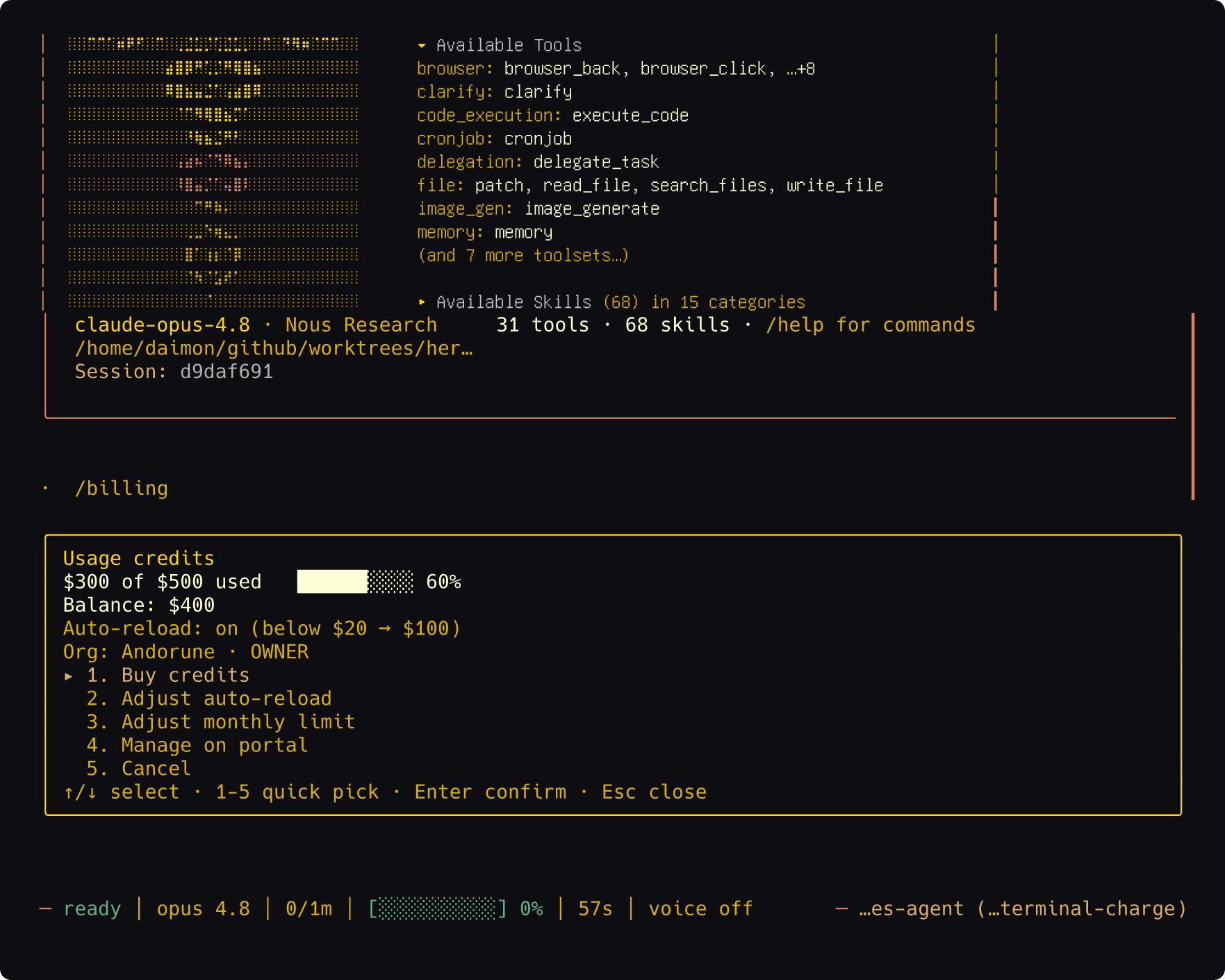
This is convenient, but plan changes and auto-reload still deserve the same review you would give a billing website. Read the amount and effective date before confirming.
Security work is broad, not flashy
The release includes a long list of hardening changes: tighter Vertex credential scoping, removal of some credential paths from subprocess environments, guarded local-media reads, webhook body-size caps, additional token redaction, safer browser and .env handling, sanitized computer-use subprocess environments, and CI protection against untrusted reference interpolation.
No release eliminates the risk created by an agent that can run commands and access tools. The useful signal is that credential boundaries, file reads, webhooks, transports, and child processes are being treated as separate attack surfaces instead of one generic “security” checkbox.
Should you upgrade now?
Upgrade promptly if you use the gateway, background delegation, desktop app, reasoning models, or multiple profiles. Those workflows receive the largest practical improvements.
Upgrade in a maintenance window if Hermes controls production infrastructure or depends on custom plugins, unusual providers, or tightly scoped credentials. Back up first, update, run diagnostics, and test one representative task per critical integration.
Wait and observe only if your current version is stable, offline, narrowly scoped, and the new features do not affect your workflow. Even then, review the security fixes rather than delaying automatically.
How to update safely
The supported path for an existing managed installation is:
# See what is installed now
hermes version

# Optional: check whether an update is available
hermes update --check

# Update the managed installation
hermes update

# Verify the result and run diagnostics
hermes version
hermes doctor
The v0.19.0 CLI notes warn that pip and Homebrew installs are unsupported paths. Do not substitute pip install -U hermes-agent for the documented managed updater unless you intentionally maintain a nonstandard installation and understand the trade-offs.
Before updating a production gateway:
- back up the Hermes data and configuration you would need for recovery;
- record the current version and active profiles;
- confirm how secrets are currently loaded;
- update during a window where delayed messages are acceptable;
- test one CLI turn, one gateway message, one background delegation, and one secret-backed tool;
- check logs for profile routing or delivery retries before declaring the upgrade complete.
What not to overread
The release notes report roughly 2,245 commits, 1,065 merged pull requests, 2,465 files changed, 3,300 issues closed, and more than 450 community contributors since v0.18.0. Those numbers communicate the size of the development window, but they are not a substitute for workflow-specific testing.
Likewise, “production-ready” is not a universal state. A local research assistant, a personal Discord bot, and an agent with deployment credentials have different failure costs. Quicksilver makes Hermes faster and adds important recovery mechanisms. You still need least-privilege credentials, backups, explicit deny rules, observability, and a rollback plan.
The bottom line
v0.19.0 earns an upgrade because it improves how fast Hermes feels when everything works and how much state it preserves when something fails.
The startup work gets your attention first. The delivery ledger, durable background completions, vault-backed secrets, and profile isolation are why the release keeps paying off after that. If Hermes already does real work for you, schedule the upgrade.
Continue with the Hermes course
Turn the release notes into a working setup with these lessons:
- What Hermes Agent is and where it fits: understand the difference between the model and the agent harness.
- Install Hermes on Mac or a VPS: get a local test running, then move to an always-on server when you need 24/7 operation.
- Choose between the TUI and desktop app: decide which of the newly faster interfaces fits your workflow.
- Route models for performance and cost: use the expanded provider and reasoning controls without overspending.
- Secure a tool-using agent: apply least privilege, approval controls, secret hygiene, and recovery planning.
- Build automations with cron, Kanban, and subagents: use the durable background-work improvements on real recurring jobs.